Jobs
Two kinds of jobs
There are two kinds of jobs. Ordinary jobs are simple long-running tasks that get executed once. Scheduled jobs are jobs that are scheduled to run one or more times when a certain trigger fires.
An example of an ordinary job is annotating an entity with four different annotators. It gets configured by the user on the annotator screen in the data explorer and it gets executed immediately and asynchronously when the user clicks a button. The job gets executed once.
An example of a scheduled job is a nightly job that imports data from a URL. A scheduled job can get executed more than once.
Job Execution
Each time a job gets executed, its execution is represented by an instance of
an entity that extends from the JobExecution entity.
This helps:
- To keep a record of all information used to create the job
- To uniformly log the progress and status of the job execution
- To uniformly show Progress bars and a list of recently executed jobs in the Jobs plugin.
The JobExecution entity is abstract, so you will not find a repository for it.
Extend the entity for new job types.
If your job runs outside of Molgenis, like in R or on the cluster, it should update its JobExecution entity through the REST API to keep track of progress and status.
Job class
There's an abstract Job class that you should probably extend to implement a molgenis job
that runs in Java.
You implement the call(Progress) method. If you the method returns normally, the job status
will be set to SUCCESS. If it throws an exception, the job status will be set to FAILED.
There's no support yet to cancel a running job.
The result type of the call method is a template parameter of the Job class.
It can be any type you like. You can use specify class Void and return null if you're not
interested in the result of the job execution.
You can start the job execution synchronously by calling call() on the Job instance or
you can use a standard Java ExecutorService to schedule it in a different thread.
Progress interface
Use the Progress interface to log the progress of the job execution.
You, as creator of the job, decide how to report and scale the job's progress.
The value provided to the progress() method will be written to the progressInt
attribute of the JobExecution entity and displayed in the progress bar.
If you specify a value for progressMax, the progress bar will be set to a width
proportional to progressInt/progressMax. Otherwise it'll be full width, and animated
while running.
The progress message plus the time the method was called will be logged in the log
attribute of the JobExecution entity.
Job Factory
All information needed to run the job is written to the JobExecution entity.
This means that all information needed to run the job is serialized to primitive
attribute values and references to other entities.
Create a Job factory class to instantiate your Job instances. The Job objects aren't beans
so you cannot autowire them and cannot annotate the methods. The Job factory probably
is a bean so you for example the DataService can be an @Autowired field of the
Job factory and the Job factory can pass it to the Job instance when it creates the Job.
Transactions and running as user
The Job class will make sure that the job gets executed in a transaction, and run with
as the user that is specified in the JobExecution entity.
Progress will get logged outside of the transaction, so that it is available even if
the job is still running.
The wisdom of having such long-running transactions is debatable, so we probably should make the transactionality optional in the long run. But so far the jobs that we've created all needed to be transactional.
Job React Components
You can use the Job React Components to easily display a uniform progress bar.
Use the JobContainer to display a progress bar for a single JobExecution.
Use the JobsContainer to display a refreshing overview of JobExecutions currently running
and in the past.
It needs a URL prop that it'll query regularly to keep the overview up to date.
The mechanism for updating the screen is very simply polling the server for a complete
overview for all jobs, so be careful not to overdo it.
Job Scheduling
The execution of scheduled jobs is not that different from executing an ordinary job.
Create the JobExecution entity instance at execution time, one for each execution of
the scheduled job and feed it to the Job factory.
Quartz Jobs
If you use quartz to schedule a job, you implement the QuartzJob interface and schedule
its class to be run.
Quartz Job details
Job-specific data can be stored in the JobDataMap which is passed to quartz when you schedule the job.
But since we have repositories to store information, you can also create a repository or settings object to store the details for the scheduled job. As a benefit the details of that entity can be updated in the settings editor.
If there's more than one instance of the job scheduled, you can store its ID in the JobDataMap when you schedule it.
Quartz job execution
The QuartzJob's fields will get @Autowired by the molgenis AutowiringSpringBeanJobFactory.
So you can autowire a field in your QuartzJob to contain your Job factory bean.
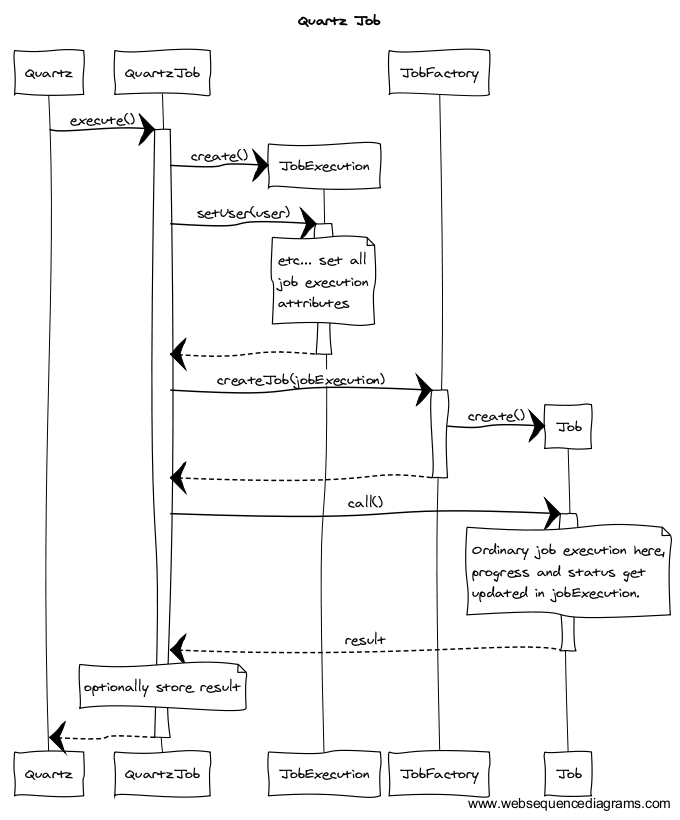
Upon execution of the QuartzJob, instantiate a JobExecution entity.
Send it to the (autowired) Job factory to create a molgenis Job instance.
The QuartzJob's execute method will already be run on a separate thread so you can then
call the call method of your Job instance synchronously.
Example of an existing Quartz job
Take a look at the FileIngesterQuartzJob class for an example.
Take a look at the FileIngestRepositoryDecorator that decorates the FileIngest repository
to reschedule the FileIngesterQuartzJob when its entities get updated or deleted.